A return policy tends to get treated as legal boilerplate, something to paste into the footer and forget. Shoppers read it, though, and for a store they’ve never heard of, many check it before anything else. They can’t handle the product or try it on, and they’re paying someone they know nothing about. If the policy is clear and fair, they know that a bad purchase won’t cost them the full price. That can be the difference between buying and closing the tab.
Below is how to write one that reads as trustworthy and where to set it up in Shopify.
Why a Return Policy Helps You Sell More
A return policy can bring in sales rather than cost you them. Shoppers who know they can send something back are more willing to click “buy,” especially at a store they don’t know yet. A policy that’s easy to find also shows there’s a real business behind the site that deals with problems.
It saves you work, too. If the answers are already written down, fewer people will email you with “can I return this?” before ordering, and if someone does return an item, you can point to the policy instead of negotiating it case by case.
Some customers will send things back. That’s part of selling online, and a policy that’s hard to find or hard to follow tends to cost you more in lost orders than the returns do.
What to Include in Your Return Policy
Keep your return policy short and make it answer the questions shoppers are already asking. Here’s what to cover:
- Time limit. Most stores allow 14, 30, or 60 days. Choose what your business can handle, and say when the clock starts. Counting from the delivery date is friendlier than the order date, since shipping eats into the window.
- Condition. Say whether items must be unused, in the original packaging, or have tags attached.
- Exclusions. Custom-made items, final-sale products, and hygiene items are the usual ones that can’t be returned. If you have any, list them, and repeat the note on those product pages.
- What they get back. That could be a refund to the original payment method, an exchange, or store credit. If it’s store credit only, say so up front. Finding out at the end feels like a bait-and-switch.
- Return shipping. Decide who pays. Many stores cover it when the item is wrong or damaged but not when someone just changed their mind. Whichever you choose, write it down.
- How to start a return. Keep the steps few. For example: “Email us your order number, and we’ll send instructions.”
- Refund timing. Say how long after you receive the item the money will arrive. That heads off most “where’s my refund?” emails.
- Contact. Give an email address or a contact page for anything the policy doesn’t answer.
Write it Like a Human
Write your return policy the way you’d explain it to a customer standing in front of you. Stiff legal wording makes people wonder what you’re hiding.
Here’s the difference:
“Merchandise may be returned pursuant to the conditions herein within thirty (30) calendar days of receipt.”
“Not happy with your order? You have 30 days after it arrives to send it back.”
The second one says the same thing in half the words, and a shopper will remember it. Use that tone, but keep the details exact: the number of days, what condition the item needs to be in, and who pays for shipping.
People skim this page, so keep paragraphs to a couple of lines and put anything with several parts into a list.
A Simple Example You Can Adapt
Here’s a sample you can start from. Swap in your own details wherever you see brackets.
Returns: If something isn’t right, you can send it back within 30 days of delivery.
What we take back: Items that are unused, in the original packaging, and in the condition you received them.
What we don’t accept: Gift cards and final-sale items.
How to start a return: Email [your email] with your order number, and we’ll reply with the steps.
Refunds: Once your item reaches us, the money goes back to your original payment method within [number] business days.
Return shipping: You cover it, unless the item arrived damaged or wasn’t what you ordered. Then we pay.
Anything else: Write to [your email], and we’ll get back to you.
Remember to change any rule that doesn’t fit your business before you publish.
How to Add It in Shopify
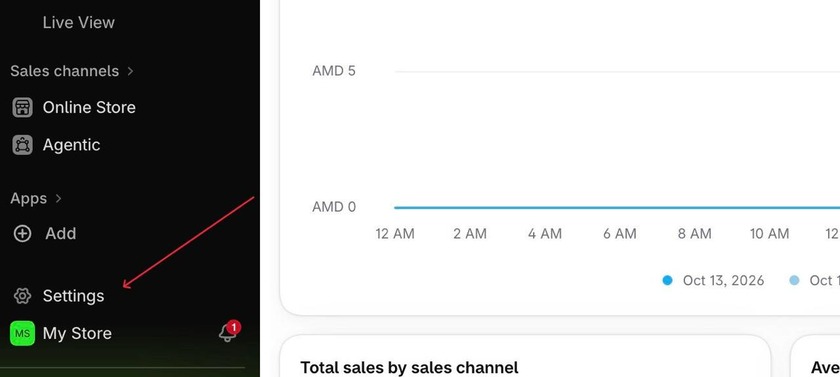
Shopify makes this part easy. In your admin, go to the Settings section.
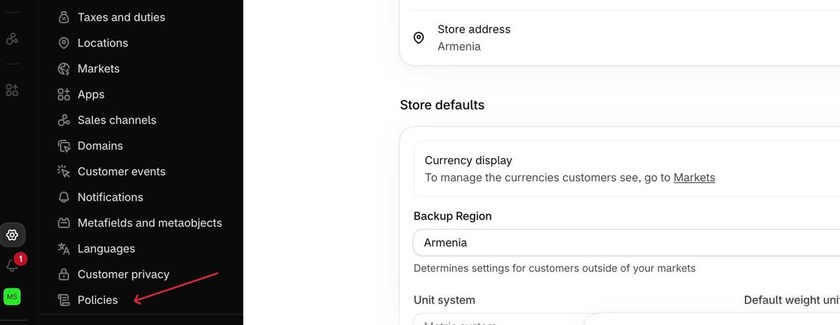
Then click Policies (it’s usually at the very end of the list)
Once you click on the Policies section, you will see this tab open. Here you can see the list of policies you can add. You’ll find a spot for your refund (or return) policy. Shopify also offers templates you can use as a starting point and edit to fit your store.
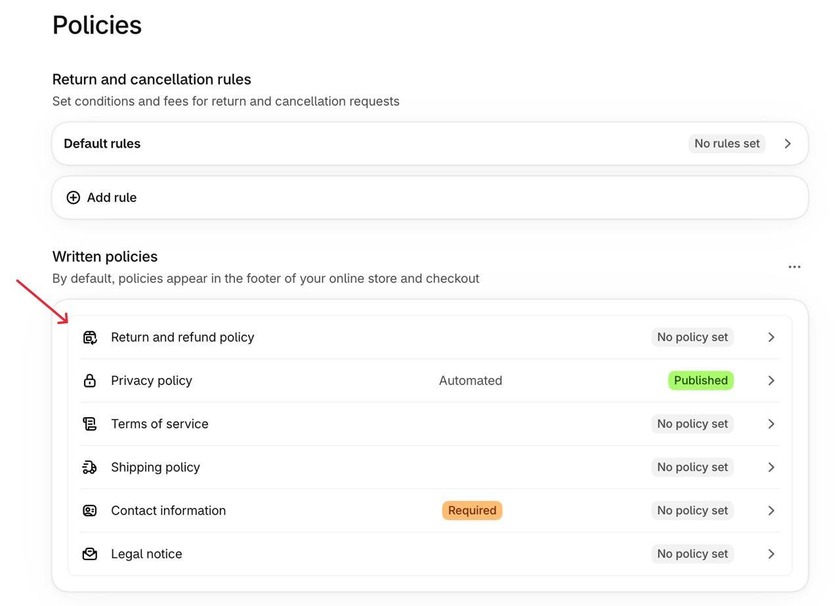
Once you click on it, a tab will open where you can enter your policy text and edit it.
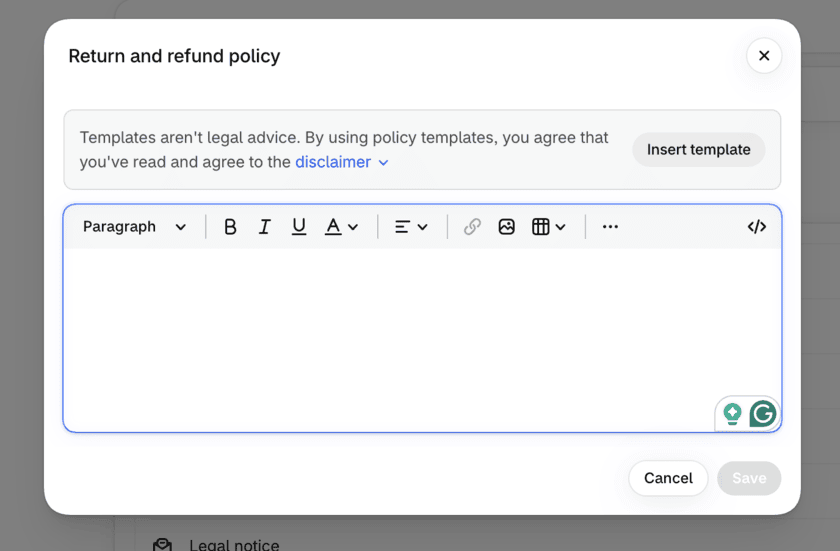
Once you save the policy, Shopify can display it at checkout and link to it from your store. That’s a start, but shoppers need to find it well before they reach checkout. Put a link in your footer menu so it appears on every page. If your theme allows it, add one to your product pages near the add-to-cart button, since that’s where people hesitate. Your FAQ page and order confirmation emails are good spots for a link too.
Shopify renames menu items now and then. If your admin interface doesn’t match this description, look for Policies under Settings.
Mistakes to Avoid
- Vague wording is one. A line like “returns accepted at our discretion” leaves shoppers unsure whether they’ll get their money back, so give them a number of days and a condition instead.
- Strictness without a reason is another. A seven-day window or a long list of exceptions can push people away. Before you add a rule, ask what it protects you from.
- Copying another store’s policy word for word is risky too. Their margins, products, and shipping setup aren’t yours, and you could end up promising refunds or free return shipping you can’t afford.
- Then there’s a clumsy process. If a return takes three emails and a form, the customer will remember that, so keep it to the fewest steps you can.
- Finally, an outdated policy causes trouble. When your shipping, products, or rules change, update the page the same day.
Frequently Asked Questions
- How long should my return window be?
Thirty days is a common choice, but it depends on what you sell. A shop selling clothing might allow 30 days, while one selling made-to-order furniture might allow 14. Pick a window you can handle without strain. - Do I have to offer free returns?
No. Plenty of stores make customers pay return shipping. Just say so before checkout, so nobody finds out after the fact. - Will a generous policy mean lots of returns?
You’ll get some returns. Whether the extra orders cover the cost depends on your margins, so track your return rate. If certain products come back a lot, look at those pages. Unclear sizing or a vague description is often the cause. - Where should I show my return policy?
Link it in the footer, near the add-to-cart button on product pages, and at checkout. - Can I use a template?
Yes. Shopify offers templates to start from. Read through each rule before you publish and change anything that doesn’t match how you run your store.
A return policy tells shoppers what happens if the order doesn’t work out. Write it in plain words, spell out the days and the conditions, and link it somewhere people will see it before they pay. Shoppers who know they can send something back are more willing to buy, and a return that goes smoothly gives them a reason to order again.

