When you’re new to Shopify and open Shopify Analytics for the first time, it can feel like something super complicated. There are many charts, percentages, date reports, and much more. And you have to understand all of it before you can start running your store.
But the thing is, you don’t have to understand all of it at once; there are a few important numbers you need to check, and that’s it. Once you know which ones matter the most, it will become much easier to manage your store.
Here is a simple guide to the most important numbers that are worth tracking, what each one means, and what to do when something is off.
First, Where to Find Your Numbers
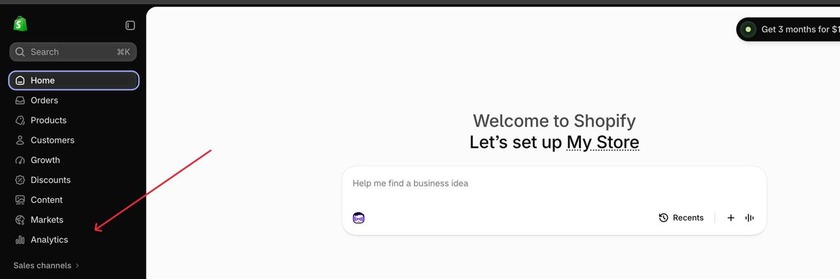
In your Shopify admin, look for Analytics in the left menu. That’s where you’ll find your reports and a live view of what’s happening in your store. Which reports you can see depends a bit on your plan, so don’t worry if yours looks slightly different from someone else’s.
Let’s get to know the most important numbers worth looking at
1. Sessions (Your Traffic)
A session is one visit to your store. If your report says 200 sessions, that’s 200 visits. Someone who comes back three times in a week counts as three.
When sales are low, look at sessions first. Either not many people are finding you, or they are showing up and leaving without buying. Low sessions point to a traffic problem. Healthy sessions with few orders point to something on the site, like the product page, the price, or checkout.
2. Traffic Sources (Where Visitors Come From)
Traffic sources show where your visitors came from: a Google search, Instagram, an email you sent, a paid ad, or someone typing your address straight into their browser.
The sources that send the most people often aren’t the ones that send the buyers. Say Instagram brings 800 visits a month and nobody orders, while your email list brings 60 and a dozen of them do. If you only looked at visit counts, you’d put your effort in the wrong place.
So compare sources on orders, not visits. Find the one where the people who show up actually buy. That’s where your next hour of work or your next ad dollar should go.
The Instagram and email numbers are made-up examples to make the point concrete, so swap in your own or drop them if you’d rather keep it generic.
3.Conversion Rate
Conversion rate is the percentage of visitors who end up buying. Out of 100 visitors, 2 orders means a 2% rate.
There’s no universal “good” number. A shop selling $8 phone cases and one selling $2,000 sofas will land in very different places, so ignore what other stores report and track how yours changes month to month.
One pattern to catch: traffic climbing while conversion slides. That usually means the extra visitors are hitting a snag, like pages that load slowly, product pages that don’t answer basic questions, or shipping costs that only show up at checkout.
4. Average Order Value (AOV)
AOV, which stands for average order value, is how much a customer spends each time they place an order. Make $1,000 from 20 orders. Your AOV is $50.
It’s important to keep an eye on it because it is one of the ways to make more money without getting more customers. Imagine you have 100 orders each month. Each order is worth $50. That adds up to $5,000. If the average order value goes up to $55, you get $5,500 from the 100 orders, which means $500 more without any extra customers.
If your average order value is low, there are a few simple things you can try. Combining products is effective, such as selling a shampoo and a conditioner together at a small discount.You can also offer an item on the cart page, such as a phone case alongside a charger. Free shipping when the order reaches a certain amount encourages people to add one more item to qualify. Set the minimum a little higher than your current average order value so it is a small push rather than a big challenge.
5. Add-to-Cart Rate
Add-to-cart rate is the share of visitors who put something in their cart. If 1,000 people visit and 80 add an item, that’s 8%. It sits between browsing and paying, so it shows you where people lose interest.
A low rate with decent traffic points at your product pages. Check the photos first, since a single blurry or generic image can lose a sale. Then read the description as a stranger would, and ask whether it answers the obvious questions. Price and trust matter too: no reviews, no return policy, or a checkout that looks sketchy will make people hesitate.
When people add to cart and still leave, the problem is after that click. Shipping costs that only appear on the last page are a frequent cause. A long checkout form or a missing payment option, like PayPal or Apple Pay, can also cost you the sale.
6. Cart and Checkout Abandonment
Abandoned checkouts are the people who got as far as entering their details and then left without paying. Some of that is unavoidable, since people get distracted, compare prices, or change their minds. If most of the people who start checkout don’t finish, though, something in the process is turning them away.
The usual suspects are shipping or tax that only appears on the last page, a form that asks for too much, and a short list of payment options. If you’ve set up a recovery email, it sends a reminder a few hours after someone leaves, and a fair number of them come back and finish the order.
7. Top-Selling Products
Sort your products by units sold, and you’ll see two groups quickly: the few that sell all the time and the many that barely move.
Put your best sellers where people see them first. Give them your strongest photos, and if you run ads, they’re the safest place to spend. For the slow ones, try rewriting the description or dropping the price. If that doesn’t help, it may be time to stop stocking them.
Then check the margins. A $15 item that sells 300 times a month can earn you less than a $60 item that sells 40, once you count what it costs you to make, ship, and advertise. Sales volume alone can hide that.
8. Returning Customer Rate
The repeat customer rate shows the percentage of your customers who place another order after a previous purchase. For example, if 100 people purchased something in the last quarter, and 15 of them returned, your repeat customer rate equals 15%.
It is important to keep track of this indicator because attracting a repeat customer is significantly less expensive than acquiring a new one through advertisements. The repeat customer is an individual who has already experienced the product or service, so contacting him or her via an email is much cheaper than running ads.
If the repeat customer rate is low, it is essential to analyze what happens after the initial purchase. The marketer needs to consider the follow-up emails that retailers send to customers a few weeks after the purchase or emails that inform customers about discounts for their next purchases.
9. Customer Acquisition Cost (CAC)
CAC denotes the average amount spent to acquire a customer. If you spent $500 on advertising and acquired 25 customers, your CAC would be $20. It is important to note, however, that Shopify does not necessarily calculate this metric for you, so you have to do the calculations independently by taking the total sum you spent on marketing in a specific time period and dividing it by the number of clients you managed to attract in the corresponding time frame. After that, you compare this number with how many customers are, on average, paying you money. In case you invest $20 to attract a client who pays you $50 and costs you $30 to produce, then you are making around break-even point on the very first order. But if your CAC exceeds the amount of money you receive from the customer through orders, when
10. Profit (Not Just Sales)
This one is easy to forget. Sales are exciting, but sales aren’t profit. After you pay for products, shipping, ad spend, app fees, and everything else, how much do you actually keep?
Take some time, even once a month, to look at what’s left after costs. A store with lots of sales and no profit is a stressful place to be.
A Simple Weekly Routine
You don’t need to stare at charts all day. Try this once a week, in about 15 minutes:
- Look at sessions and traffic sources. Where is your traffic coming from?
- Check your conversion rate. Is it going up, down, or staying the same?
- Look at your average order value.
- Take a quick look at your top products.
- Write down one thing you noticed and one small thing you’ll try this week.
Once a month, add the bigger ones: returning customers, acquisition cost, and profit.
You don’t need to be a data person to run a good store. You just need to know what’s going on in it. Start with three numbers: sessions, conversion rate, and average order value. Look at them every week or so and compare them to your own earlier results, not to another store’s.

