Ask most store owners how to raise order size, and they’ll say discounts. “Spend $100, get 10% off” is the traditional way. It does bring in bigger orders, but every one of them costs you 10%, and if you run it constantly, shoppers learn to hold off until the next sale.
You can get people to spend more without touching your prices. Someone buying a phone sees a case in the cart, and it just seems helpful. If it showed up on a page of random products, they’d ignore it.
Let’s go through some simple ways to do it.
What Is Average Order Value (and Why Care)?
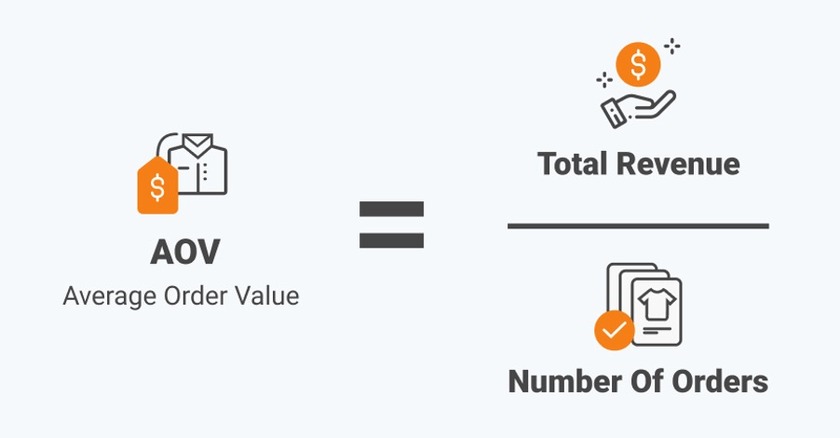
Average order value, or AOV, is what a customer spends per order, on average. Earn $2,000 from 40 orders, and your AOV is $50.
Raising it doesn’t take more visitors. If the people already coming to your store each spend a little more, your revenue goes up. You’ve already paid to get those people there, so most of the extra money is profit, minus whatever the added items cost you to buy and ship.
Shopify Analytics shows your current AOV. Write it down before you change anything, so you can tell later whether a bundle or a free shipping threshold made a difference.
1. Offer Bundles That Make Sense
A bundle is a set of products sold together. A shampoo, conditioner, and hair mask packaged as a ‘hair care set’ are typical examples. Shoppers tend to welcome bundles when the items clearly belong together because bundles save them the work of figuring out what else they’d need.
So build bundles around how your customers actually use your products. Ask what someone buying their first one would also need, then package it. A starter kit for a beginner works this way, and so does a full routine for someone who wants the whole process handled.
Bundles also put products in front of people who would never have scrolled to them. A customer who came for the shampoo might discover they like the hair mask.
2. Show “Frequently Bought Together” Suggestions
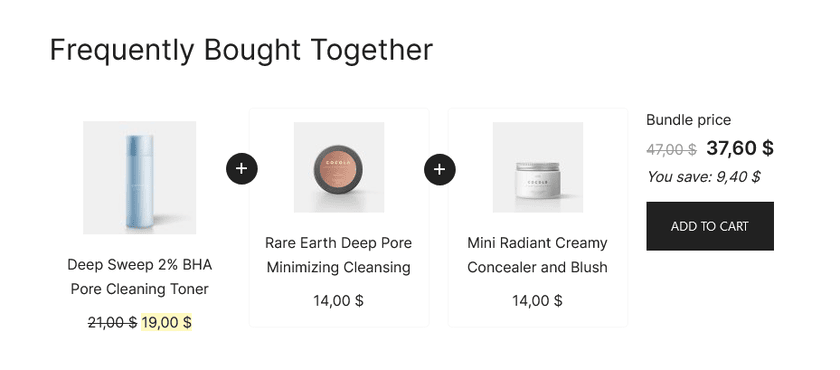
Big shopping sites do this constantly. Scroll down a product page and you’ll find a row labeled “Customers also bought” or “Pairs well with.” Shoppers don’t have to go searching for the extras, and the row catches things they would have remembered only after checking out.
Shopify has built-in product recommendations, and the app store has plenty of add-ons that do the same job. You can also pick the pairings yourself. Either way, check each suggestion against one question: would a buyer of this product plausibly want that one too? A phone case next to a phone passes. A scented candle next to a phone doesn’t, and it makes the whole section look automated.
3. Add a Free Shipping Threshold
Offer free shipping once a cart hits a certain amount, and plenty of shoppers will add another item rather than pay for delivery.
Start with your current AOV and set the threshold a little above it. If most people spend about $40, try $50. A $100 threshold is too far off, and most shoppers will just pay the shipping fee or leave.
Then put a message in the cart that updates as they shop, something like “Add $12 more for free shipping.” Seeing the exact gap makes it easy to close.
Before you launch, check the math. If an order of $50 costs you $8 to ship and your margin on it is $15, you keep $7. If the margin is $10, you’re nearly out of profit on every order that qualifies.
Since the offer doesn’t touch product prices, your listed prices stay where they are, and shoppers still feel like they got something for free.
4. Suggest a Better Version (Upselling)
An upsell means offering a better, pricier version of the thing a shopper is already looking at. Someone viewing a 12-ounce bottle might see a 20-ounce one, or a premium formula, or a set that includes extras.
People will pay more when they can see what the extra money gets them. Say what’s different: a bigger size, longer life, better materials, a free extra. Keep the jump small, too. Someone looking at a $30 product might go up to $40, but a $150 suggestion looks like a different product altogether.
Some stores show three tiers side by side: a basic, a mid-range, and a top option. In many cases the middle one gets picked most, with a smaller group going for the top.
5. Offer Add-Ons in the Cart
Right before checkout, a small extra can slip into the order without much fuss. Gift wrapping is the obvious one. A travel-size version of something they’re buying, or a cheap accessory that goes with it, works too.
Price matters here. Keep the extra cheap next to the main purchase. A $5 add-on on a $60 order is easy to accept without a second thought, while a $40 one on that same order starts to look like a separate decision.
6. Try Post-Purchase Upsells
Once someone has paid, they’re often open to one more small purchase. Some stores show a single offer right after checkout that adds the item to the order with one click, so the customer doesn’t re-enter their card details. If someone just bought a coffee grinder, a bag of beans fits. A discount on a pet bed doesn’t.
Show one offer, and make sure it relates to what they bought. Shopify has some built-in options for post-purchase offers, and the app store has more. Which ones you can use depends on your plan and setup, so check your admin before you promise anything to readers.
7. Sell Bigger Sizes or Multi-Packs
If your product gets used up, a bigger size or a multi-pack gives regular customers a way to buy less often. Someone who goes through a bag of coffee every two weeks may happily take a three-bag pack so they don’t have to reorder.
A small markdown is enough for a multi-pack. Buying a bigger pack already spares the customer a reorder, so the discount only has to be big enough to notice: three bags should cost visibly less than three single bags. Print the per-unit price next to the pack price so nobody has to pull out a calculator.
8. Build Gift Sets and Curated Collections
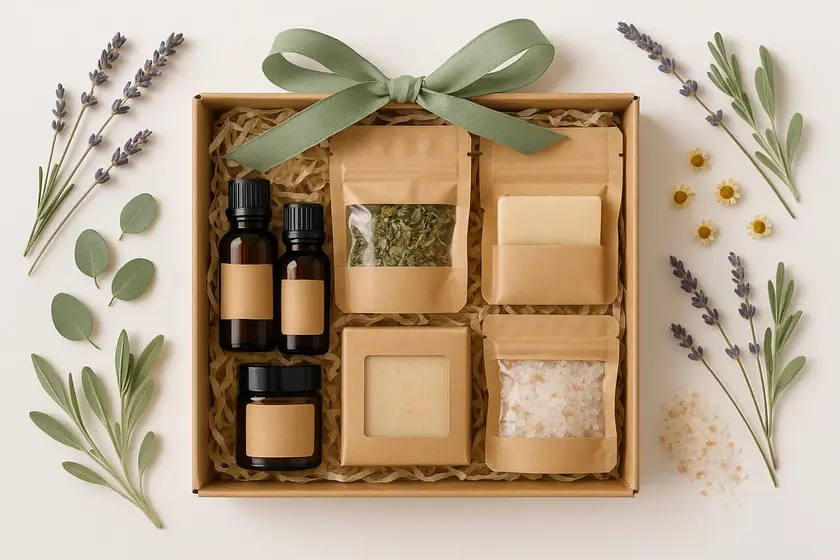
Shoppers buying a gift want something they can hand over without much fuss. A ready-to-give set, with the items picked out and packaged together, saves them from piecing one together themselves, and some will pay a bit more for that. A candle, a matchbox, and a small card in a box make a gift. Three separate products on a page is homework.
Collections help too. A page titled “Gifts under $50” gives a shopper with a budget a place to start, and one called “The Beginner’s Set” tells a newcomer what to buy first. Either can lead to a bigger order than the single item they came in for.
How to Start
You don’t need to do everything at once. Here’s a simple order:
- Check your current AOV in Shopify Analytics.
- Add a free shipping threshold just above your AOV.
- Set up “Frequently Bought Together” suggestions on your best sellers.
- Create one or two bundles.
- Wait a few weeks, then compare your numbers.
Change one thing at a time so you can tell what’s really making a difference.
You can increase your average order value without having to reduce your prices. Offer complementary products that accompany what the customer is already purchasing and provide free shipping once the total passes a set threshold so that people would be inclined to purchase additional items. Apply this strategy for a few weeks and see if your AOV improved. If it has, you can keep applying this strategy, but if it hasn’t, apply the other variant.


