Think about the last time you bought something you’d never tried. You probably read a few reviews first. A product page with no reviews gives shoppers nothing to go on except your own description, and plenty of them will go and look elsewhere. If your Shopify store doesn’t have reviews yet, add them. The steps for setting them up come first, followed by how to put them to use once they start arriving.
First, Something to Remember
Shopify can’t collect or display product reviews on its own, so you’ll need an app. It used to have a free one, Product Reviews, but Shopify has since discontinued it, so ignore any older guide that recommends it.
Judge.me, Loox, and Yotpo are three of the options in the App Store. Pricing varies: some have a free plan, others charge by the month, and their features aren’t identical. Install a couple, compare how they look in your theme, and keep the one you like.
How to Choose a Review App
The most expensive app isn’t automatically the best one. A review app needs to do five things well:
- Be easy to set up. You should be able to get it running without a developer.
- Send review requests. It should email customers after they buy, because most happy customers won’t write a review unless they’re asked.
- Accept photos and videos. A photo of the product in use tells a shopper more than a star rating, particularly for clothing, beauty, and home goods.
- Look right in your theme. Install it, then open a product page on your phone and check that nothing is cut off or hard to read.
- Have pricing you understand. A free plan is fine to start with, but find out what it caps, such as monthly review requests.
Before you install, read the app’s most recent reviews in the App Store, especially the ones that mention support.
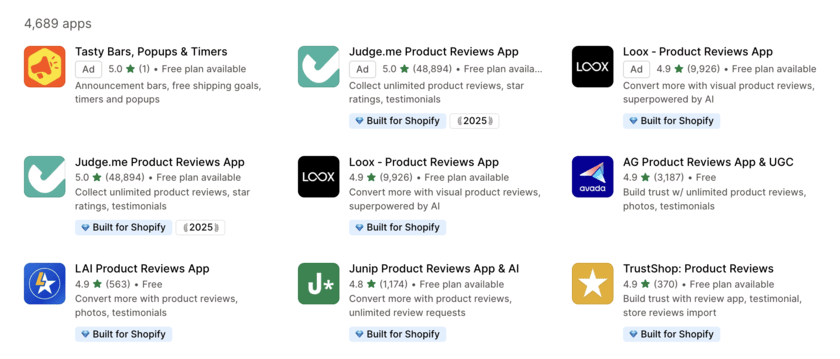
How setup works, in short
Setting up a review app takes three steps. Install it from the Shopify App Store. Turn on its review widget so the stars and reviews appear on your product pages. Then switch on the review request emails, which ask customers for a review after they buy. When that’s done, open a product page on your phone and check that it all looks right. Every app words these steps a little differently, so use its own setup guide for the exact buttons.
Getting Your First Reviews
A new store has a problem: shoppers look for reviews, and you can’t have any until someone buys. Here’s how to get the first few:
- Email your first customers yourself and ask for an honest review. A short note that reads as personal gets a better response than a template.
- Turn on your app’s automatic review requests, so each new order triggers one.
- Keep the review form short, since every extra step loses some people.
- If you have real reviews from another platform, check whether your app can import them. Bring in only reviews from actual customers.
When is the right time to ask for a review
When you ask for a review affects how many you get. A request sent on the day of purchase reaches someone who doesn’t have the product yet, so the replies will be fewer, or will be about shipping. Try asking a few days after the order arrives, so people have had time to use it. Products that take longer to judge, such as skincare or supplements, need a longer wait. Look for the delay in your app’s settings, and change it if the number of reviews stays low.
How to Use Reviews Effectively
Collecting reviews is the first step. Here’s what to do with them once you have some.
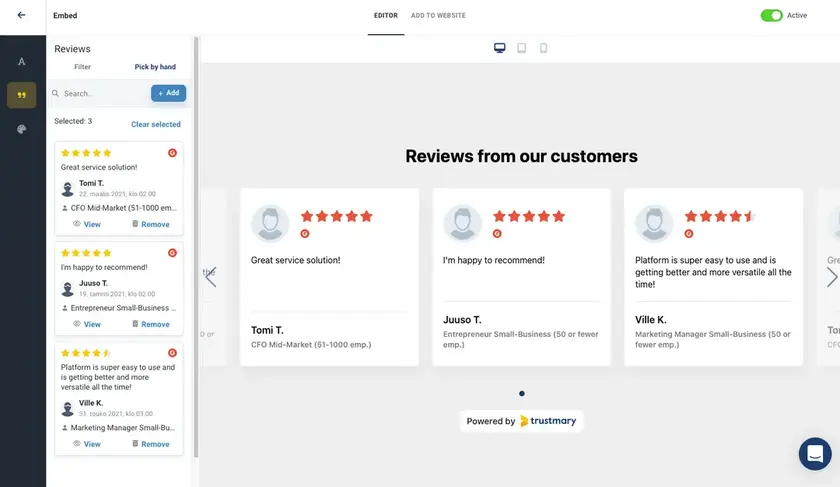
- Begin by putting star ratings on your product pages. Next think about adding star ratings to your collection pages and your homepage well. This way shoppers will see star ratings early.
- Choose a few of your strongest reviews and give them their own section on the homepage. Reviews with photos or concrete details do the most to convince people.
- A good customer quote can also go into ads, emails, and social posts. Check your app’s settings first to see whether you’re allowed to reuse reviews that way.
- Reply to reviews. Thank people for the good ones, and answer the bad ones calmly with an offer to help. Other shoppers read your replies, and a sensible response to a complaint can reassure them.
- Read the reviews for patterns, too. If several people say the sizing runs small or the instructions are confusing, fix the product page or the product itself. That may also mean fewer returns.
- Leave the lower ratings up. A store with nothing but five-star reviews can look suspicious, and a few honest critical reviews make the good ones easier to believe.
How to Handle a Negative Review
A bad review stings, but other shoppers read your reply as well as the review. They notice how you treat someone who’s unhappy. Keep it short and calm, and give the person something to do next. For example:
“Thanks for telling us, and we’re sorry the sizing wasn’t right. Please email [your email] with your order number, and we’ll sort it out.”
Don’t argue with the reviewer or put the blame on them, and write each reply fresh, since the same one pasted under every review looks automated. If a review points to something you can fix, like unclear instructions, fix it and mention the change in your reply.

Common Mistakes to Avoid
- Asking before the product has arrived. You’ll get fewer reviews, or reviews about shipping rather than the product.
- Making the review form long. Each extra step loses people.
- Leaving bad reviews unanswered. Other shoppers can see that nobody replied.
- Faking or buying reviews. Fake reviews are against the rules in many countries, and shoppers can often tell.
- Skipping a mobile check. A reviews section that works on a laptop can be cramped or cut off on a phone.
Frequently Asked Questions
- Does Shopify have built-in product reviews?
Not on its own, so you’ll need a review app. Shopify’s old free one has been discontinued, so pick a current app from the App Store. - Are there free review apps?
Yes, several have free plans. They usually cap something, such as the number of review requests, so check what’s included before you rely on one. - How many reviews do I need before they make a difference?
There’s no set number. A few real reviews already show a new shopper that other people have bought from you, and a bigger pile gives them more to go on. - What should I do about a bad review?
Reply politely, say you’re sorry about the problem, and offer to fix it. Arguing with the reviewer looks bad to everyone reading, and deleting a review only because it’s negative can also cause trouble. - Can I use reviews in my ads and emails?
Often, yes, but check two things first. Your review app’s settings may limit how reviews can be reused, and the rules where you sell may require the reviewer’s permission.
Shoppers are more willing to buy when other customers have vouched for a product. Choose a review app that’s easy to set up and sends requests for you, and ask a few days after the order arrives. Then read what comes back. Reply to each review, look for patterns worth fixing, and leave the honest, critical ones up. A handful of real reviews tell shoppers something your product descriptions can’t.


